Main Server
This is the server that all clients intitially connect to. For now it will contain lobby making functions as well as character customization and microtransaction facilitation. It will allow players to create or join a game. It will also start the htmc_server binary which houses the actual game.
Login
- The main server is responsible for logins as well. However, it always expects at least 8 bytes:
size: 2
player_id: 4
message_type: 2
To solve this we will send null for player_id when we send the login message.
Playing the Game
The main server binary is always running. For now it will run on the same server. It will take port 9000 and the game server will be given a random port between 9001-9999.
The main screen on the client will have two buttons related to starting the game: Play and Quick Play

Play (Play a Game)
Typical Flow
Clicking on the “Play” button brings the player to a lobby screen. The client will send a SERVER_CREATE_LOBBY message. Since the player_id is unique we will use that as the lobby_id as well. The lobby_id will change as the host changes. The lobby_id (player_id) will be added to a map map_lobby_id_to_player_ids.
The lobby screen looks like this:
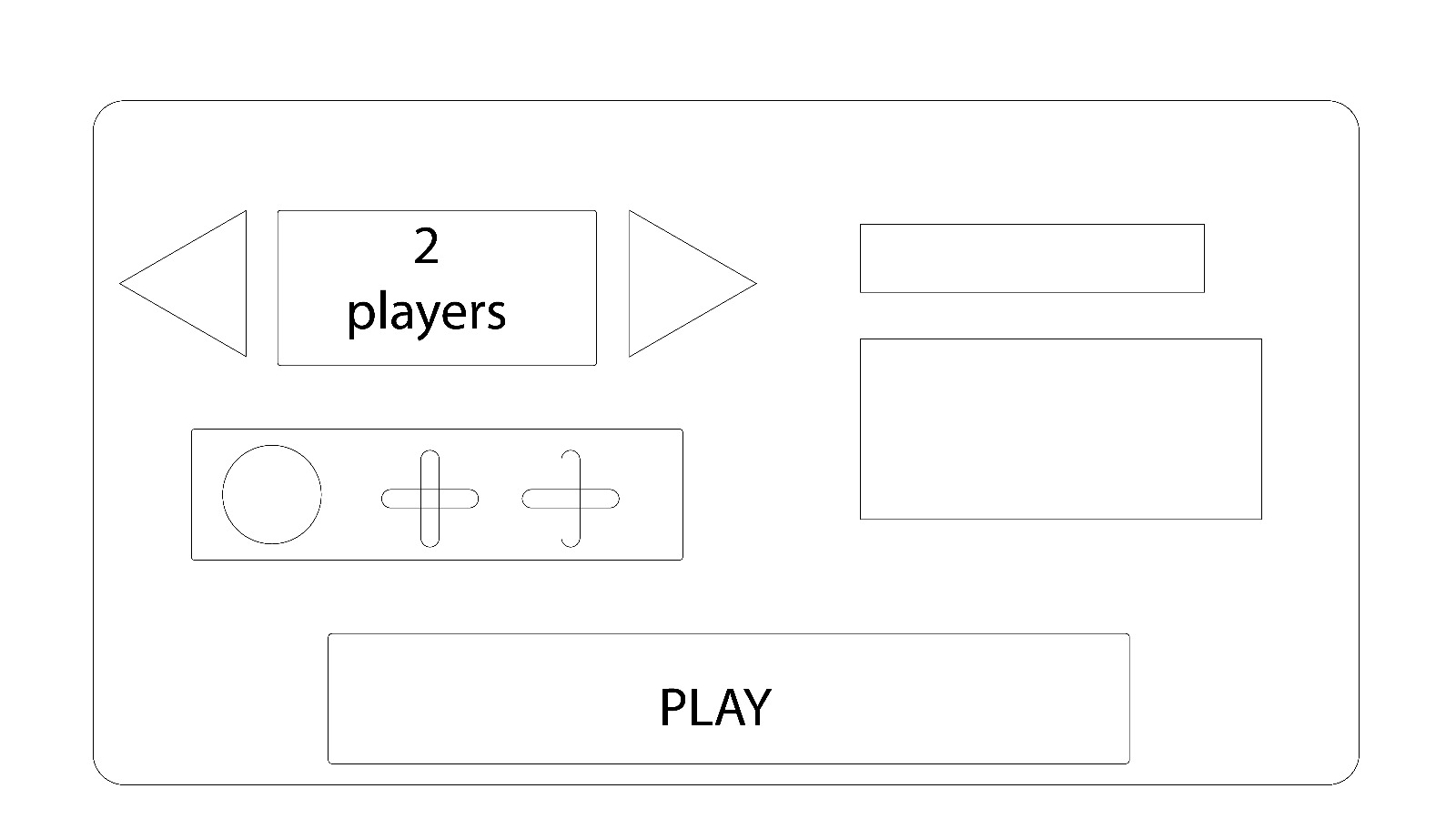
Here the player can select the number of players in the game and can even invite their friends to play with them.
If the main player wishes to invite their friend, they will need to first click on the plus icon. The client will send a SERVER_REQUEST_FRIENDLIST message to the server. The server will reply with a SERVER_FRIENDLIST message containing the friends and their online status (offline / online / in-game). A list will then appear from which the player can then select one online friend to send an invite to.
Once a friend from the list is selected, the client will send a SERVER_SEND_GAME_INVITE message containing the friend’s name (player_ids are kept private for security reasons). The server will add this invite to a list of pending invites. The friends’ client will then receive a game invite (SERVER_FORWARD_GAME_INVITE message) which can either be declined (SERVER_GAME_INVITE_DECLINED → SERVER_FORWARD_GAME_INVITE_DECLINED) or accepted (SERVER_GAME_INVITE_ACCEPTED → SERVER_LOBBY_UPDATE). The server will remove the invite from the pending invite list after receiving the response from the friend client. If the friend client accepted, it will not change to the lobby screen until it receives a SERVER_LOBBY_UPDATE message. If the friend doesn’t accept within a certain amount of time (60 seconds), the invite will become void and a SERVER_GAME_INVITE_TIMEOUT message will be sent to both the main client and the friend client. Note that if the player was already in another lobby and they accept the invite, everyone in the lobby will receive a separate SERVER_LOBBY_UPDATE message indicating how their lobby has updated.
The main client can also cancel an invite with a SERVER_CANCEL_GAME_INVITE. Which would then send a SERVER_VOID_GAME_INVITE to the friend client and also remove the invite from the pending invite list. SERVER_GAME_INVITE_VOIDED will be sent to the main client to confirm invite cancelation.
Once joined, the main client can send a SERVER_KICK message which kicks the friend. The server will send SERVER_LOBBY_UPDATE to the friend client. Likewise, the friend can choose to leave the lobby with SERVER_LEAVE_LOBBY → SERVER_LOBBY_UPDATE.
Note: SERVER_LOBBY_UPDATE is multipurpose. It will container the full list of players in the lobby and it will be sent to everyone (main client + friend client). As mentioned it will be sent when a friend accepts an invite, when they are kicked from the lobby, and when they leave the lobby themselves.
The lobby itself is the prime resident here. If the creator leaves, any friends that have joined will remain in the room. Remaining players will be promoted to “host” in the order they received invites. Host capabilities involve kicking players and starting the game. When the last player leaves the lobby, it will be removed.
Race conditions
Due to the nature of the internet, there are a few race conditions that can occur.
As mentioned above, to minimize weird screens on the friend side, the friend will wait for a SERVER_LOBBY_UPDATE message from the server before loading the lobby screen.
Let’s start by looking at timeouts. The SERVER_GAME_INVITE_TIMEOUT message is sent out by the server to both the main client and the friend.
If the main client cancels the invite and the timeout message arrives afterwards, the main client can simply ignore that message. Assuming the friend client hasn’t accepted / declined the invite (covered next), the friend client can show an “invite expired” notification.
If the friend client accepts or declines the invite and then the timeout arrives, the server will not do anything. The friend client can once again simply post the “invite expired” notification.
Now let’s look at voiding invites. Recall that the main client expects a SERVER_GAME_INVITE_VOIDED confirmation message before updating the UI.
If the main client receives a
SERVER_LOBBY_UPDATEmessage after it has sent theSERVER_CANCEL_GAME_INVITEmessage, the server has already moved the friend into the lobby. Therefore, the main client will need to add the player to the lobby and display a “Invite cannot be cancelled” notification.If the main client receives a
SERVER_FORWARD_GAME_INVITE_DECLINEDmessage after it has sent theSERVER_CANCEL_GAME_INVITEmessage, the server has already removed the invite from the active invite list. The main client can therefore remove the pending invite animation as if their cancellation went through (SERVER_GAME_INVITE_VOIDED). Note: the timeout case is covered above.If the friend client receives a
SERVER_VOID_GAME_INVITEmessage after they have sent the acceptance, they will receive a notification that the invite was voided and they will not join the lobby screen. At this time the server has already voided the invite. Recall that the friend client normally receives aSERVER_LOBBY_UPDATEmessage before switching screens.If the friend client receives a
SERVER_VOID_GAME_INVITEmessage after they have declined the invite, the friend client does not need to do anything. At this time the server has already removed the active invite.
The final condition is when all three entities (main client, friend client, and server) all do something at the same time. The only thing that the server does without the action of a client is timeout the invite. Since this architecture is server-authoritative, we will hold true to this and consider the invite as timed out. Each client will then post the appropriate notifications depending on the situation.
Starting the Game
Once the lobby is built, the host (the main client) clicks the “Play” button. The main client will send a SERVER_PLAY_GAME to the server. If the room is full the server will immediately start a game for the players in the lobby with a SERVER_GAME_INFO message. If there are still empty spots, the server will try to match the players with any other lobbies that are waiting. To let players know they are in a queue the server will send a SERVER_LOBBY_QUEUED message. If the game cannot be filled the lobby will be placed in the queue and wait for more lobbies to be created. Whenever the server receives a new SERVER_PLAY_GAME, it will look through the lobby queue and try to fill in the longest waiting lobbies with the new players. Note: There is some subtlety to this as lobbies have different player numbers.
Message List
Message |
Description |
TxRx (server) |
|---|---|---|
|
Create the lobby |
Rx |
|
Ask for friendlist including online status |
Rx |
|
Response to |
Tx |
|
Send invite to friend client |
Rx |
|
Forward invite request |
Tx |
|
Friend client declined invite |
Rx |
|
Forward |
Tx |
|
Friend client accepted invite. Triggers |
Rx |
|
Update lobby on friend join, on kick, or on leave |
Tx |
|
Cancel active invite |
Rx |
|
Forward invite cancelation |
Tx |
|
Confirm invite has been voided (sent to host) |
Tx |
|
Host (first player) chooses to kick the invited friend. Triggers |
Rx |
|
Player leaves lobby. Triggers |
Rx |
|
Friend did not accept or decline in time. |
Tx |
|
Start the game already |
Rx |
|
Lets clients know a match is being formed |
Tx |
|
Gives clients the details for the game instance |
Tx |
Quick Play
Now that we understand how the lobby play system works, let’s look at Quick Play. The client will immediately send a SERVER_PLAY_GAME. Since the server keeps a map of the player_ids mapped to game lobby from the Play button (previous section), the server will look to immediately place the player in a lobby. It will prioritize the longest waiting lobby so that they can start the game faster. If a lobby is found and the game can start immediately the client will receive a SERVER_GAME_INFO message immediately. If no lobbies are in the queue, the player will be placed into a separate available quick players queue and will receive a SERVER_LOBBY_QUEUED message. If the next SERVER_PLAY_GAME is also a quick player they will be matched together in a 1v1. Otherwise, the quick player will be moved to the waiting lobby.